

-
Upload photo
Re-upload
Accepting: jpg, png. Max file size: 10 MB
Buyer’s Guide: Best POS Systems for Sourcing
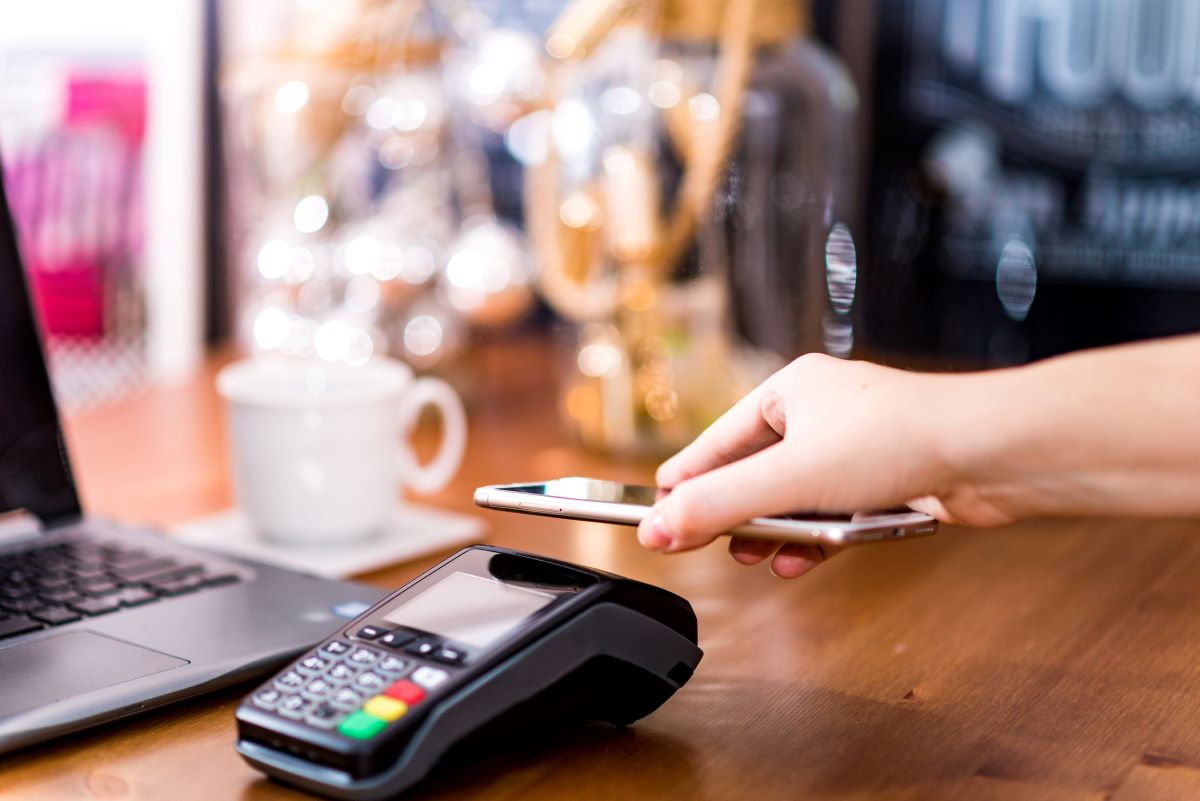
Image source: Getty/Drazen Zigic
A POS (point of sale) system is the technology used to manage transactions between a business and its customers. It typically includes hardware components -- such as a cash register or terminal, barcode scanner, and receipt printer -- as well as software that allows the business to process sales, manage inventory, and generate reports, among other functions. It can help businesses streamline their operations, improve customer service, and gain insights into their sales and inventory performance.
A POS system can be used in a wide variety of businesses, including retail stores, restaurants, cafes, gas stations, hospitals, and others.
In a retail store, for example, a POS system would be used to scan items, calculate the total cost of the purchase, and process payment. It may also track inventory levels, generate reports on sales and inventory, and provide insights into customer behavior.
Depending on the software features, retailers can track pricing accuracy, inventory changes, gross revenue, and sales patterns. Using integrated technology to track data helps retailers catch discrepancies in pricing or cash flow that could lead to profit loss or interrupt sales.
Modern POS systems often include additional features such as customer relationship management (CRM) tools, employee management tools, and integrations with other business applications like accounting software and e-commerce platforms. Some POS systems also offer cloud-based solutions, which allow businesses to access their data and manage their operations from anywhere with an internet connection.
Using a POS system offers benefits like centralizing inventory management, collecting real-time sales data, building customer profiles, accepting payments anywhere, improving in-store sales, and adapting to changing business requirements.
The global POS market, forecast to reach $29.02 billion in value by yearend 2023, is projected by Fortune Business Insights to grow to $81.15 billion by 2030, at a CAGR of 15.8 percent.
The growth of the POS systems market is being driven by several factors, including digitization, the increasing adoption of cloud-based POS systems, rising demand for mobile POS systems, and the growing use of POS systems in various industries, such as retail, hospitality, and healthcare. In addition, the significant increase in cashless transactions enabled by smartphones is another growth driver.
The hardware segment of POS systems, which currently holds the larger market share over the software POS segment, is expected to hold its own, but the software segment will experience high growth.
North America is currently the largest market for POS systems, followed by Europe and Asia-Pacific. The Asia-Pacific region is expected to grow at the highest CAGR over the forecast period, driven by the increasing adoption of mobile payment systems and the expansion of the retail industry in countries such as China and India.
A short history of POS systems
POS systems can be traced back to the introduction of the first cash register, which was invented by an Ohio, USA saloon owner named James Ritty in 1879. Ritty was faced with the problem of having dishonest employees who were stealing money from the saloon’s cash drawer, so he created a machine that could record sales and prevent theft. The device, called "Ritty's Incorruptible Cashier," used a system of gears and counters to track transactions and was the precursor to modern POS systems. Ritty’s machine was inspired by a mechanism he saw on a steamship that counted the number of times the ship’s propeller revolved.
In the years that followed, various inventors and companies continued to refine the technology, adding new features and capabilities. In the 1970s and 1980s, the introduction of computer technology and barcode scanning revolutionized the way POS systems worked, allowing for faster and more accurate processing of transactions.
Today, POS systems are an essential tool for businesses of all sizes and types. They are constantly evolving to meet the changing needs of the marketplace, with features like mobile payments, cloud-based solutions, and integrated customer relationship management tools becoming increasingly common.
What are the components of a POS system?
Hardware and software are the two general components of a POS system.
Some examples of POS hardware are:
- Credit and debit card readers
- Terminals
- Registers
- Cash drawers
- Receipt printers
- Tablets or monitors
- Barcode scanners
- Self-ordering kiosks
- Kitchen printers
- Label printers
Although hardware is an important component of POS systems, it is not necessary in every case. For example, businesses that operate only online would not require POS hardware.
The second key component of a POS system is software, which is of two kinds – on-premises and cloud-based.
On-premises POS system software, sometimes called a legacy system, is accessible only on the POS terminal where it’s installed. It is generally used with accounting software.
Cloud-based POS software syncs data from multiple POS terminals in one place or in several locations and offers mobile and desktop access.
What are the 5 Types of POS Systems?
There are several different types of POS (point of sale) systems, each with its own features and capabilities. Here are five common types:
- Traditional POS systems: These are the most common type of POS system, consisting of a physical terminal, cash drawer, and receipt printer. They can be used for a variety of businesses, including retail stores, restaurants, and service-based businesses.
- Mobile POS systems: These systems use mobile devices like tablets or smartphones to process transactions, giving businesses greater flexibility and mobility. They are often used by small businesses or those that require mobile sales, such as food trucks or pop-up shops.
- Self-service kiosks: These systems allow customers to process their own transactions, such as ordering food or purchasing tickets. They are commonly used in fast-food restaurants, movie theaters, and other venues.
- Online POS systems: These systems are used for e-commerce businesses and allow customers to make purchases online. They often integrate with other e-commerce platforms and payment gateways to process transactions securely.
- Cloud-based POS systems: These systems store data in the cloud, allowing businesses to access their sales and inventory data from anywhere with an internet connection. They are often used by multi-location businesses or those with complex inventory management needs.
Aside from these common systems, an example of more recent versions are crypto POS systems. These systems allow customers to make transactions using cryptocurrencies such as Bitcoin, Ethereum and others. They typically generate a unique QR code or address for each transaction, which the customer scans or sends the cryptocurrency to using their digital wallet. The transaction is then verified and processed and recorded by the blockchain network.
Overall, the type of POS system a business chooses will depend on its specific needs and requirements.
How does a POS system work?
Here's how a typical POS system works:
- A customer selects items to purchase and brings them to the checkout counter.
- The cashier or employee scans the items using a barcode scanner or manually enters the price into the POS system.
- The system calculates the total cost of the purchase, adds any applicable taxes or discounts, and displays the amount owed to the customer.
- The customer pays for the items using cash, credit/debit card, or other payment methods.
- The POS system records the transaction and updates the inventory levels accordingly.
- The system then generates a receipt for the customer, which includes details of the transaction.
In addition to processing transactions, a POS system can also be used to manage inventory, track sales data, and generate reports on business performance. Modern POS systems often include additional features such as customer relationship management (CRM) tools, employee management tools, and integrations with other business applications like accounting software and e-commerce platforms.
When does a business need a POS system?
A business may need a POS system if it engages in any type of sales transaction, whether in person or online. Here are some specific situations where a business may benefit from a POS system:
- Retail businesses: Retail businesses that sell products to customers, such as clothing stores or electronics stores, can benefit from a POS system to manage transactions, track inventory, and generate sales reports.
- Restaurants and cafes: Restaurants and cafes can use a POS system to manage orders, process payments, and track inventory. POS systems can also be used to manage table assignments and generate reports on sales and customer behavior.
- Service-based businesses: Service-based businesses, such as salons or spas, can use POS systems to manage appointments, process payments, and track customer data.
- E-commerce businesses: E-commerce businesses that sell products online can use POS systems to process payments and manage orders. POS systems can also integrate with e-commerce platforms and payment gateways to provide a seamless online shopping experience for customers.
- Multi-location businesses: Businesses with multiple locations, such as chain stores or franchises, can use POS systems to manage inventory and sales data across all locations, making it easier to track performance and make informed business decisions.
In sum, a POS system can help businesses of all types and sizes streamline their operations, improve customer service, and gain insights into their sales and inventory performance.
What types of businesses use POS systems?
POS systems are used by a wide range of businesses, both large and small, that engage in sales transactions. Here are some examples of the types of businesses that commonly use POS systems:
- Retail stores: Retail stores of all sizes, from small boutiques to large department stores, use POS systems to manage transactions, track inventory, and generate sales reports. Some fuel retailers also use gas station POS systems.
- Restaurants: Restaurants and cafes use POS systems to manage orders, process payments, and track inventory. POS systems can also be used to manage table assignments and generate reports on sales and customer behavior.
- Service-based businesses: Service-based businesses, such as salons, spas, and gyms, use POS systems to manage appointments, process payments, and track customer data.
- Hospitality businesses: Hotels, resorts, and other hospitality businesses use POS systems to manage room charges, process payments, and track inventory.
- E-commerce businesses: E-commerce businesses that sell products online use POS systems to process payments and manage orders. POS systems can also integrate with e-commerce platforms and payment gateways to provide a seamless online shopping experience for customers.
- Healthcare providers: Healthcare providers, such as doctors' offices and pharmacies, use POS systems to manage patient data and process payments for services and prescriptions.
Any business that engages in sales transactions can benefit from a POS system. They provide accurate and efficient management of sales transactions, inventory, and customer data, which helps businesses make informed decisions and improve their bottom line.
What are the advantages of POS systems?
POS systems offer numerous advantages for businesses, which include:
- Strengthening efficiency: POS systems streamline day-to-day operations, reducing the time spent on manual tasks and speeding up transactions.
- Managing stock with ease: Inventory management is simplified through real-time tracking, making it easier to maintain accurate stock levels and reorder products as needed.
- Maintaining price consistency: POS systems ensure consistent pricing across all sales channels, reducing the possibility of pricing errors and discrepancies. This is particularly helpful for businesses with multiple stores in different places.
- Tracking staff activities: Monitoring employee performance and productivity is made easy with POS systems, allowing business owners to identify areas for improvement and reward high-performing staff.
- Simplifying payroll: While not handling the entire payroll process, POS systems make it easier for business owners to track employee hours and calculate wages.
- Enhancing security: Modern POS systems come with improved security measures, particularly in mobile POS systems, which protect sensitive data and reduce fraud risks.
- Offering multiple payment options: POS systems support various payment methods, saving time for businesses and customers, and enhancing customer satisfaction.
- Personalization and marketing: Many POS systems have built-in marketing tools or integrations, making it easier to manage and execute targeted marketing campaigns and promotions.
- Automating inventory tracking: Real-time inventory tracking ensures businesses always have accurate data on hand, reducing the risk of stockouts and overstocking.
- Improving customer experience: By streamlining processes and providing personalized marketing efforts, POS systems help businesses deliver a better overall customer experience.
What are the benefits of POS systems?
Here are some of the key benefits:
- Improved accuracy: A POS system reduces the risk of errors in transactions and inventory management, as it automates the process of calculating totals, taxes, and discounts. This can help businesses avoid costly mistakes and discrepancies in their financial records.
- Increased efficiency: A POS system can speed up the checkout process and reduce wait times for customers. It also streamlines inventory management, reducing the time and effort required to track stock levels and reorder products.
- Better inventory management: A POS system can track inventory levels in real-time, giving businesses better insight into their stock levels and enabling them to make informed decisions about when to reorder products.
- Enhanced reporting: A POS system can generate detailed reports on sales, inventory, and customer behavior, giving businesses valuable insights into their performance and helping them identify areas for improvement.
- Improved customer experience: A POS system can help businesses provide a better customer experience by processing transactions quickly and accurately, accepting a variety of payment methods, and providing detailed receipts.
- Increased security: A POS system can help businesses improve security by tracking all sales transactions and reducing the risk of theft or fraud.
Overall, the best POS system for a business will depend on its specific needs and requirements.
Product Gallery
Here is a gallery of products chosen by our market analyst as representing trends in POS systems on offer from verified suppliers on Global Sources:
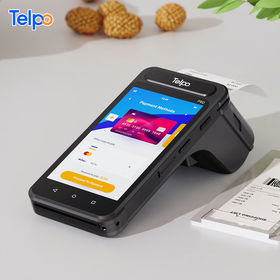
1. Handheld POS with printer
Company: Telepower Communication Co. Ltd
Model P8D-#0045 from Telepower is a handheld portable electronic funds transfer POS device with a 5in touch screen and a built-in printer for 58mm-wide thermal paper. It runs on Android 10 and supports 4G, Wi-Fi, Bluetooth, and GPS. Telepower has 22 years of manufacturing experience and offers OEM/ODM services.
Price: $79 - $109
MOQ: 1 unit
Lead time: 7 to 30 days
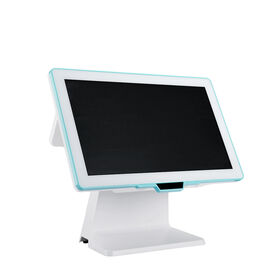
2. Desktop POS terminal
Company: Shenzhen HCC Technology Co. Ltd
Shenzhen HCC’s model HCC-A9650-1011-#8799 is an Android 7.1 desktop POS terminal with a 14.1in screen that can be tilted up to 90 degrees. It has a Rockchip RK 3288 CPU, PowerVR G61110 GPU with 600MHz clock speed, and 2G DDR3 RAM. Shenzhen HCC is an OEM/ODM service provider with an ISO 9001-certified factory. It has 14 years’ experience in smart payment terminals and solutions.
Price: $240 - $260
MOQ: 3 units
Lead time: 3 to 7 days
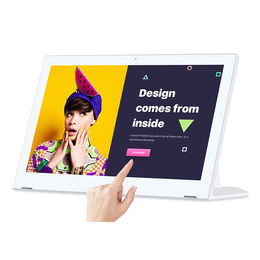
3. Tablet POS with 17.3in screen
Company: Shenzhen Electron Technology Co. Ltd
Model WL1713T- 10.01 from Shenzhen Electron is an Android-based tablet POS system with a 17.in capacitive touch screen. It has a Rockchip RK3399 processor and a quad-core Cortex-A17 CPU. Shenzhen Electron is an OEM/ODM services provider with a 10,000sqm factory.
Price: $193 - $199
MOQ: 1 unit
Lead time: 10 to 35 days
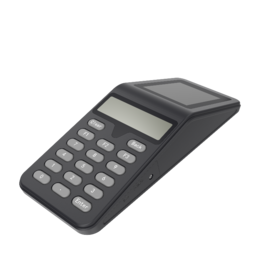
4. Handheld terminal
Company: Shenzhen Herofun Bio-Tech Co. Ltd
From Shenzhen Herofun, model BH205-#5408 is a handheld mobile POS terminal built on the MTK platform and uses GPRS for connectivity. It has a 2.4in QR code display screen and a 17-button keypad. Shenzhen Herofun has nine years of manufacturing experience in tablet PCs and biometric terminals. It provides ODM and OEM services.
Price: $88 - $95
MOQ: 1 unit
Lead time: 7 to 15 days
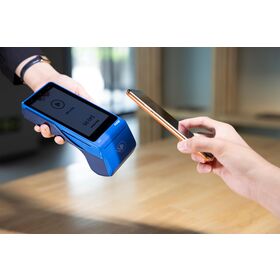
5. Mobile POS with printer
Company: Vanstone Electronic (Beijing) Co. Ltd
Model A75 Pro-5-#6061 from Vanstone Electronic is an Android 10-based mobile POS terminal with a 5in capacitive touch screen, a 2MP rear camera, and a built-in printer for 58mm-wide thermal paper rolls. It has a quad-core 64-bit ARM Cortex-A53 processor with 1.4GHz speed. It supports 4G, Bluetooth 4.2, and Wi-Fi 2.4GHz. Vanstone Electronic specializes in POS terminals and has 15 years of manufacturing experience.
Price: $105 - $220
MOQ: 1 unit
Lead time: 20 to 50 days
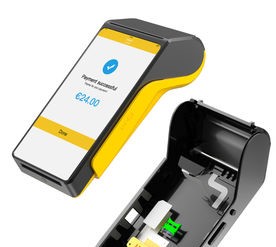
6. Handheld, with 5.5in touch screen
Company: Shenzhen Jiecheng Technology Service Co. Ltd
From Shenzhen Jiecheng, model V56-157 is an Android 10-based handheld mobile POS terminal with a 5.5in capacitive touch screen, a 0.3MP/2MP fixed focus front camera, a 5MP autofocus rear camera with flash, and a printer for 58mm-wide paper. It has a quad-core processor with 1.3GHz speed, 2GB RAM+16GB flash memory internal storage and support for MicroSD up to 32GB. Shenzhen Jiecheng specializes in payment terminals and has a 12,000sqm factory.
Price: $130 - $180
MOQ: 1,000 units
Lead time: 30 to 45 days
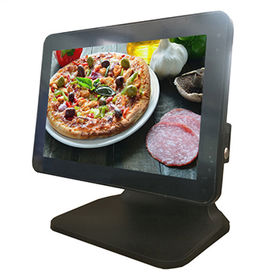
7. Desktop terminal, with 12.1in touchscreen
Company: CJ Legend Technology Co. Ltd
Model CJ-T680-03 from CJ Legend is a POS system with a 12.1in capacitive touch screen. The display has LED backlighting with a brightness of 300 nits. The unit has an industrial motherboard and a Kingston-brand RAM. CJ Legend has 10 years of production experience in LED displays and POS systems.
Price: $198 - $215
MOQ: 1 unit
Lead time: 2 to 5 days
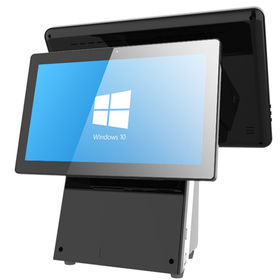
8. All-in-one desktop POS
Company: Shenzhen Long Island Forever Technology Co. Ltd
The LIFPOS007-#0257 from Shenzhen Long Island Forever is a desktop POS system that comes with a printer, metal cash box and bar code scanner. It has a 15in true-flat touch screen that supports 10-point projective capacitive touch. It also has an internal 3W speaker. Shenzhen Long Island Forever has 15 years of experience in POS systems manufacturing. It is ISO 9001-certified and provides OEM/ODM services.
Price: $420 - $430
MOQ: Please inquire
Lead time: 7 to 21 days
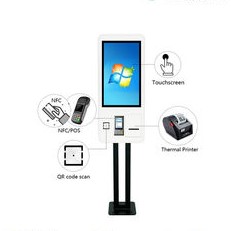
9. Self-service kiosk
Company: Shenzhen Jiacheng Electric Co. Ltd
Model JC-K002 from Shenzhen Jiacheng is a self-service kiosk with a 17in touch screen integrated with a QR code scanner, NFC/POS payment terminal and thermal printer. It can be installed either standing vertically, or as a moving stand, or as a wall-mounted device. Service applications include hotel check in/check out, airport check in, information kiosk, ID card dispenser and restaurant self-service ordering.
Price: $450 - $680
MOQ: 10 units
Lead time: 5 to 15 days
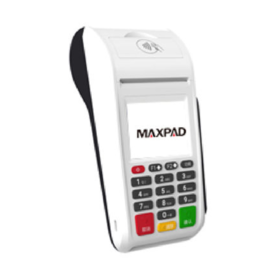
10. Handheld, with barcode scanner
Company: Shenzhen Maxpad Technology Co. Ltd
Shenzhen Maxpad’s model PK-1-26-7 has a 2.4in resistive touch screen that supports electronic signature and handwriting input. Payment method options are magnetic stripe card, IC card, NF and QR code. It supports 2G, 4G and Wi-Fi communication. Shenzhen Maxpad is an OEM/ODM service provider.
Price: $618 - $625
MOQ: 100 units
Lead time: 30 to 45 days
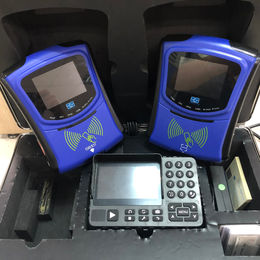
11. Bus fare POS
Company: Cardlan Technology Co. Ltd
Model CL1306-TA998 from Cardlan is a GPRS POS terminal for urban public transportation applications. It has a 3.5in LCD screen with a resolution of 320x240p. It runs on Linux 2.6 and is powered by an N32905 processor with an ARM9 core with 240MHz speed and has 32MB of SDRAM and 128MB of NAND Flash memory. Cardlan is ISO 9001-certified and has 22 years of manufacturing experience in public transport payment systems.
Price: $220 - $350
MOQ: 1 unit
Lead time: 3 to 7 days
Source the latest products from verified suppliers via global sourcing platform, and subscribe to our magazines for more in-depth insights and product discovery.
Join the Smart China Sourcing Facebook Group
- Connect with other buyers
- Ask questions
- Get advice from experts
The Related News
![]()
![]()
![]()
![]()
Serger vs Sewing Machine: Key Difference
2023/09/08